
Skip to content
Productivity & Organization Collection

LifeHub

life hub planner

Six planners live inside most people's lives right now โ€” a task app, a habit tracker, a meal planner, a budget spreadsheet, a goals doc, and a notebook trying to hold them all together. Life Hub replaces that whole stack with one private file and one dashboard that updates itself.

Why this exists

You don't need six apps. You need one that talks to itself.

Most people don't lack tools for staying organized โ€” they have too many of them. A to-do app that doesn't know your budget. A habit tracker that doesn't know your meal plan. A goals document that nobody's opened since January. Each one is fine on its own. Together, they're a part-time job.

Life Hub is one file with six modules that share information automatically โ€” log a meal once and the grocery list writes itself; check off a habit and the Dashboard updates without you touching it. Nothing to sync, nothing to re-enter twice.

A dashboard that updates itself

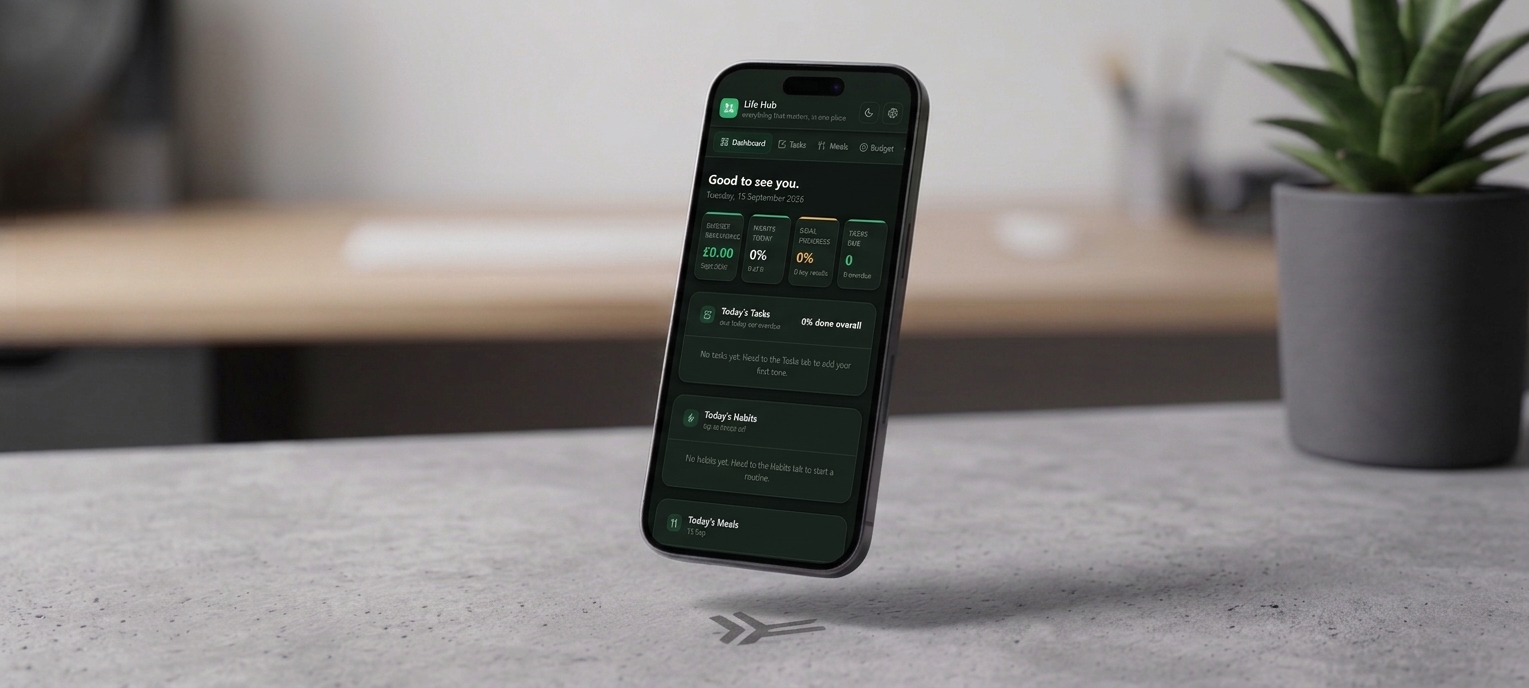
Open Life Hub and the Dashboard is already summarizing your day โ€” budget remaining, today's habit completion, average goal progress, and tasks due โ€” pulled live from the other five modules. Colour does the talking: green when things are on track, amber or red when something needs attention.

See it in motion

A video walkthrough of the whole system

Inside the download

Six modules. One system that stays in sync with itself.

Everything below is what's actually in the file you download โ€” not a mockup of a future version.

๐Ÿ  01 โ€” Dashboard

Your day, before you even ask

  • Four live cards: budget remaining, today's habit completion, average goal progress, and tasks due
  • Three short lists โ€” today's tasks, today's habits, today's meals โ€” pulled automatically from the other modules
  • Colour-coded status throughout, so what needs attention is obvious at a glance
โœ“ 02 โ€” Tasks

A to-do list that sorts itself

  • Category, priority (P1โ€“P4), status, and due date for every task โ€” overdue rows turn red, due-today amber
  • An Eisenhower Quadrant column, so what's quietly important doesn't get buried under what's merely loud
  • Filter chips โ€” All, Overdue, Due Today, Upcoming, Done โ€” to focus on what matters right now
โšก 03 โ€” Habits

Momentum, not perfection

  • Routines grouped into Morning, Daily, and Evening, laid out as a weekly grid you tap to check off
  • Current streak and success rate calculated automatically for every habit
  • Missing a day resets the streak, not the whole system โ€” the design is built around consistency, not guilt
๐Ÿฝ๏ธ 04 โ€” Meals

Plan once, shop without thinking

  • Breakfast, lunch, dinner, and snacks planned for the week from your own saved recipes
  • A grocery list generated automatically from whatever you've planned, grouped by aisle
  • Change a meal or add a recipe and the list recalculates instantly โ€” nothing to regenerate by hand
ยฃ 05 โ€” Budget

Every pound accounted for, monthly

  • Income & Fixed Expenses, a Variable Expense Log, and Spending by Category with live progress bars
  • Category bars turn amber past 80% of budget and red once you go over โ€” no spreadsheet math required
  • Sinking Funds & Savings for longer-term goals, plus a fresh, self-contained page every month
โ—Ž 06 โ€” Goals

Big ambitions, broken into things you can actually track

  • A Goal Hierarchy โ€” category โ†’ annual goal โ†’ measurable key result โ€” so ambitions stay concrete
  • Progress bars and percentages calculated automatically from your target and current values
  • A Quarterly Reflection: what worked, what got in the way, what you'll adjust โ€” three honest prompts, not a report
What actually sets it apart

Most planners give you a template. This one gives you a system that talks to itself.

One dashboard, five modules

Nothing to re-enter twice

Log a habit in the Habits tab and the Dashboard updates. Plan a meal and the grocery list writes itself. Add a key result and your goal's progress bar recalculates. Every module feeds the one view you actually open every morning.

4 live cards + 3 today-lists, built from zero manual setup
Bonus: a full Excel workbook

Prefer spreadsheets? They're included

Alongside the browser app, Life Hub ships with a fully-linked Excel workbook โ€” the same six sections, with live formulas for completion rates, streaks, category totals, and goal progress. Open it in Excel and it just works.

Command Center ยท Tasks ยท Habits ยท Meals ยท Budget ยท Goals
Built for a full life, kept private

Your tasks, spending, and goals aren't going anywhere near a server.

A system that holds your budget, your habits, and your goals in one place should be honest about where that information lives.

Local only, by design

There's no server and no account. Everything you enter lives in your browser, on your device, until you choose to export it.

Optional password lock

Turn on a password if others share your device, with a one-time recovery code as backup. It's a screen lock, not encryption โ€” a deterrent for shoulder-glances, not a vault โ€” and Life Hub says so plainly rather than overpromising.

One backup, everything included

Export a single backup file covering tasks, habits, meals, budgets, and goals โ€” and import it again on a new device whenever you need to.

What you get

One purchase, three files

No upsells, no locked modules โ€” this is everything included the moment you download.

.html

Life Hub, the app

The full six-module planner โ€” a single file that opens straight in your browser, no install required.

.xlsx

Bonus Excel workbook

The same six sections, fully formulated, for anyone who'd rather work in a spreadsheet.

.pdf

The user manual

An 11-section, page-by-page guide to every module, with screenshots โ€” a calm start, not a tech manual.

From The Lifestyle Studio

Built the way we'd want to use it ourselves

"We design every system in-house and test it in our own routines first. Life Hub started because we were tired of five different apps that didn't know about each other โ€” so we built the one dashboard we actually wanted."
โ€” The Lifestyle Studio
4.9โ˜… average across The Lifestyle Studio ยท 1,240+ verified reviews
Before you buy

Questions people ask

Do I need to create an account?

No. There's nothing to sign up for. Open the file in your browser and you're straight in on the Dashboard.

Will my data sync across my phone and laptop?

Not automatically โ€” everything is saved locally to the browser you're using, which is also what keeps it private. Use Export backup on one device and Import backup on another to carry your data over.

Does it work on my phone?

Yes โ€” the layout adapts down to small phone screens, so you can check off a habit or log an expense on the go, not just at a desk.

How do I get the files after I buy?

All three files โ€” the app, the Excel workbook, and the user manual โ€” are delivered instantly as a digital download, the same as every product in The Lifestyle Studio collection.

What if I need help setting it up?

The included 11-section user manual walks through every module page by page, and every purchase comes with a 30-day support window if you get stuck.

Ready when you are

Get LifeHub today for just $17.97

One download. The app, the Excel workbook, and the full manual. Nothing left to unlock later.

One-time purchase ยท instant digital download
Get Life Hub โ€” $17.97
๐Ÿ”’Secure Checkout
โฌ‡Instant Digital Delivery
โœŽ30-Day Support